Apple Journal vs Day One: Which Is Better in 2026?
Apple Journal vs Day One compared on price, privacy, devices, writing features and export. See which journaling app fits you better in 2026.
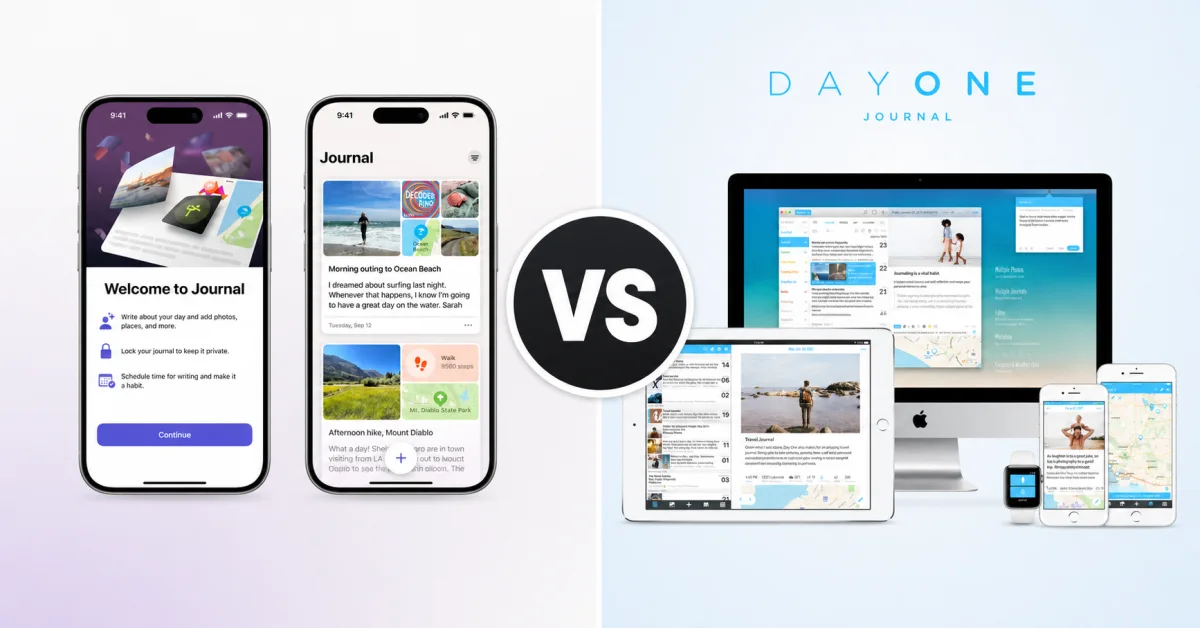
In the Apple Journal vs Day One decision, Apple Journal is the better starting point for most people who live entirely inside the Apple ecosystem: it is free, private, and far more capable than it was at launch. Day One is the better long-term tool for people who need wider platform support, deeper organisation, flexible export, or richer journaling features — but its useful paid tier costs $49.99 per year in the US. Prices were checked on 17 July 2026; local pricing varies.
The real question is whether Day One’s broader platform, organisation, archive and export tools solve a problem you actually have, or whether Apple’s built-in journal already covers the way you write.
Verdict at a Glance
Best for Apple-only users who want a capable free journal, activity-based suggestions, rich media, and minimal setup.
💙 Day One
Best for cross-platform writers, meticulous organisers, long-term archives, Apple Watch capture, flexible export, and advanced features.
Neither is universally better. Apple wins on value and native simplicity; Day One wins on range and depth.
Jump to: Essentials table · Full comparison · How to choose
Apple Journal vs Day One: the essentials
| Apple Journal | Day One | |
|---|---|---|
| Price | Free | Basic free; Silver $49.99/yr; Gold $74.99/yr |
| Supported devices | iPhone, iPad, Mac | iPhone, iPad, Mac, Android, Windows, web, Apple Watch |
| Free-plan limit | No paid feature tier | One active native device; one photo per entry |
| End-to-end encryption | Yes, with passcode and 2FA | Yes on all plans; default for new journals after key setup |
| Prompts | On-device suggestions and reflection prompts | Daily prompts, library and templates; AI on Gold |
| Organisation | Multiple journals, search, calendar, Places | Journals, tags, filters, calendar, map, media views |
| Memory features | Insights, streaks, calendar and Places | On This Day, streaks, calendar and map |
| Export | Full ZIP, PDF and print | PDF, JSON, Markdown/text and CSV, depending on platform |
| Best for | Apple users who want free and simple | Cross-platform and long-term power users |
If you are choosing among more than these two, start with our best iPhone journaling apps or the broader best journaling apps roundup. This article stays deliberately narrow: two apps, one decision.
What does Apple Journal offer in 2026?
Apple Journal began as a sparse iPhone app in 2023. The current version is a different proposition: it syncs across iPhone, iPad and Mac, supports multiple journals, and can combine text with photos, video, audio, places, drawings and state-of-mind records.
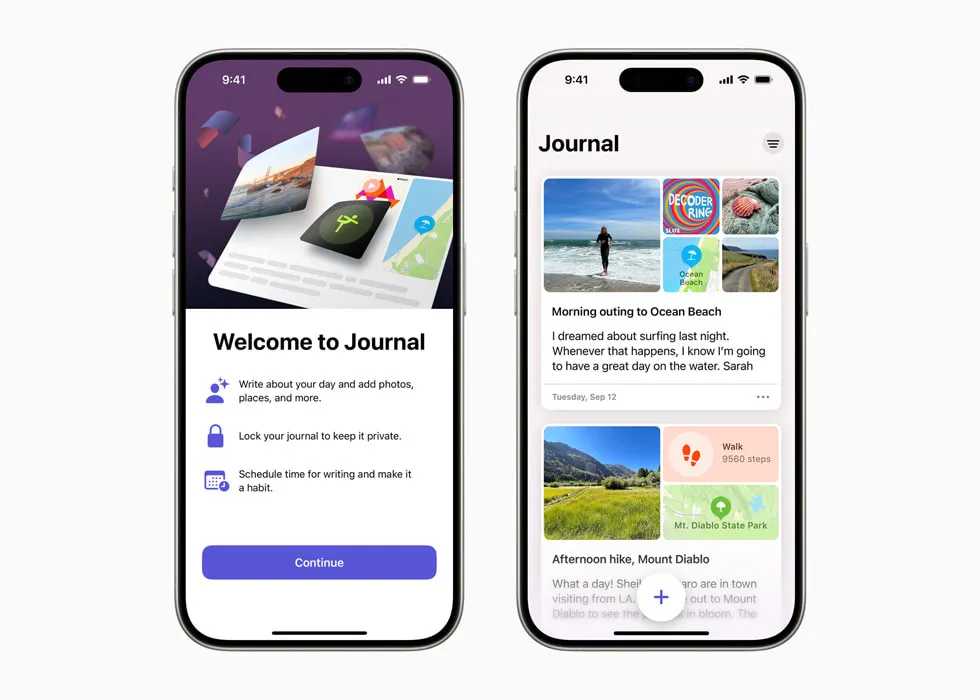
The strongest feature remains Journaling Suggestions. Apple uses on-device information such as photos, workouts, music, communications and significant locations to assemble moments you may want to remember. You choose which categories are allowed, and nothing becomes part of your journal until you select it.
Apple Journal’s best feature is not a generative analysis of what you wrote. It is a private reminder of what actually happened.
Apple has also filled in many of the original app’s gaps. Its current feature listing includes search, sorting, a calendar, a Places view, audio transcription, Apple Pencil drawing on iPad, printing, export, reminders, widgets, streaks and an Insights view.
The limit is the ecosystem. There is no Android, Windows or browser version, and Apple’s app-availability table lists Journal only on iPhone, iPad and Mac, not Apple Watch. Apple Journal makes the most sense when every device on which you might write is already a supported Apple device.
Best for: Apple users who want a private, capable journal without creating a separate journal-service account or paying for a subscription.
Skip if: You need Android, Windows, web or Apple Watch access; the reusable tags and templates Apple does not currently document; or the broadest range of export formats.
↓ See Apple Journal in the comparison table
What does Day One offer in 2026?
Day One is the mature specialist. It has been built specifically for journaling since 2011, and its advantage is visible less in any single headline feature than in how the pieces work together: templates, tags, filters, automatic context, memories, export, book printing and apps on nearly every mainstream platform.
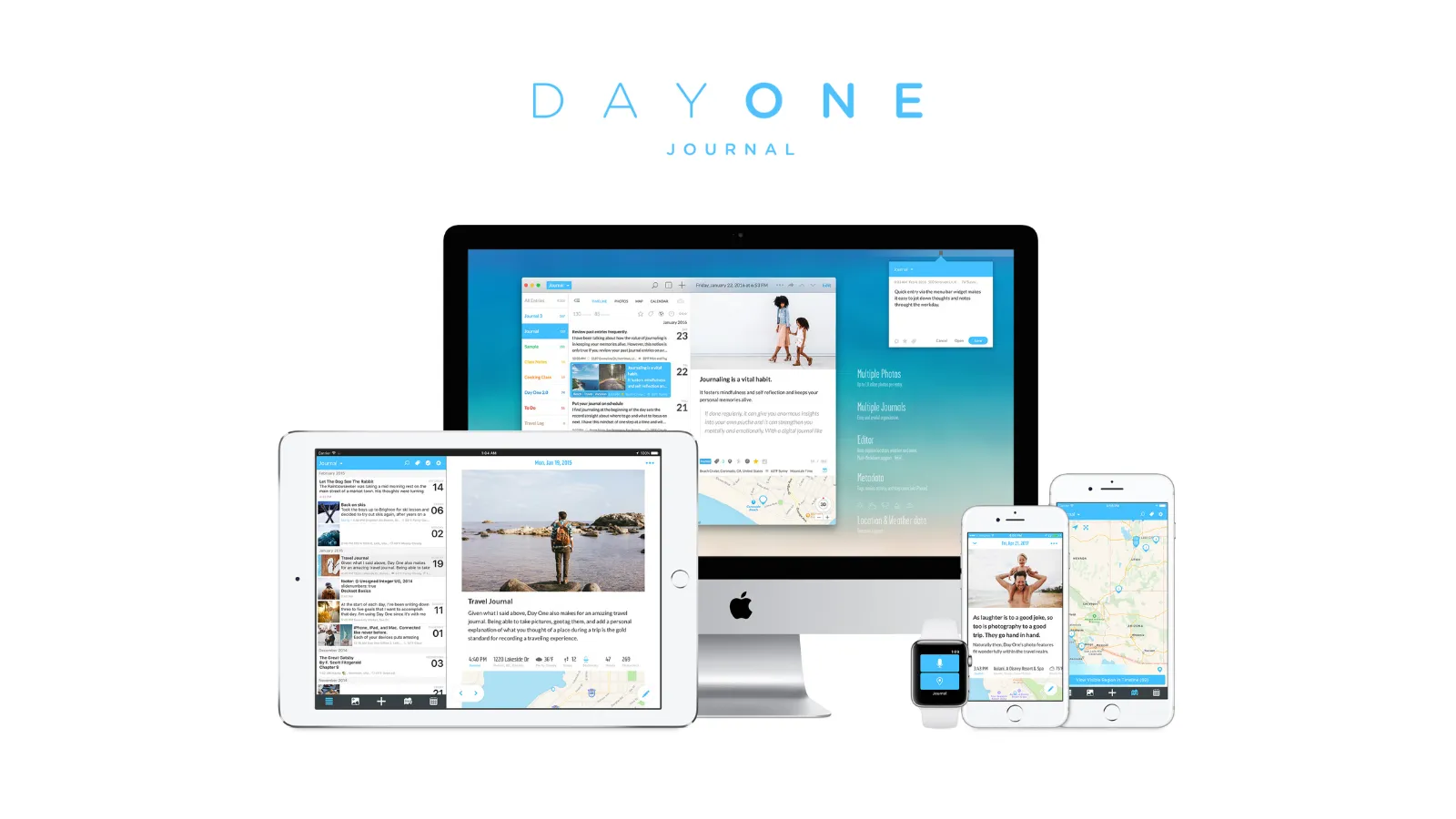
The free Basic plan is more capable than many comparisons imply. Day One’s official plans page lists unlimited text entries and journals, end-to-end encryption, prompts, templates, search, On This Day, streaks and export. Its defining restrictions are one active native device and one photo per entry.
Silver expands those practical limits. It adds unlimited-device sync, raises the allowance to 30 combined media attachments per entry, and adds video, audio with transcription, drawings, PDFs, integrations and a 25% book-printing discount. Gold adds optional AI features including Daily Chat, summaries, personalised prompts, title suggestions and image generation.
Day One is therefore not simply “Apple Journal with more buttons”. It is an archive system for people who expect to keep writing for years, change platforms, retrieve old material precisely, or produce books and exports from their history.
Best for: People who journal across platforms, organise a large archive, capture from Apple Watch, use templates and tags, or want multiple export routes.
Skip if: You use only Apple devices, dislike annual subscriptions, or mainly want a quiet place for text and a few memories.
↓ See Day One in the comparison table
Which app gives you more for free?
Apple Journal currently wins the free comparison. Apple lists the complete app as free and does not show a paid feature tier or in-app purchase. Photos, video, audio, drawings, multiple journals, iCloud sync, search, insights and export are not waiting behind an upgrade screen.
Day One Basic is still a genuine free journal. Unlimited text, unlimited journals, templates, prompts, search, E2EE and On This Day are enough for a serious one-device writing habit. The trouble arrives when you want to move between phone and computer or add more than one photo to an entry.
| Apple Journal | Day One Basic | |
|---|---|---|
| Annual price | $0 | $0 |
| Text entries | No published entry limit | Unlimited |
| Journals | Multiple | Unlimited |
| Device access | Supported Apple devices via iCloud | One active native device |
| Photos and video | Included | One photo per entry; no video |
| Audio and transcription | Included | Silver or Gold |
| Templates | Reflection prompts; no reusable template system documented | Included |
| Search and memories | Search, calendar, Places, Insights | Search, filters, On This Day |
| Encryption | E2EE with passcode and 2FA | E2EE available on Basic |
The comparison changes if you are not fully inside Apple’s ecosystem. A free app you cannot open on your Android phone or Windows computer is not useful, however complete it may be. See our best free journaling apps guide if zero cost matters more than choosing between these two.
Which has the better everyday writing experience?
Apple Journal is excellent at getting you through the first sentence. A suggestion built from a walk, a photograph or a piece of music is more concrete than a generic prompt, and the app’s visual restraint keeps the act of writing uncomplicated.
The integration runs deeper on iPhone than it does on iPad or Mac because the iPhone generates the suggestions. Apple says those suggestions can sync securely to iPad, but the phone remains the source of the activity context.
Day One is better once your journal becomes a system. Markdown formatting, reusable templates, tags, favourites, filters and calendar, map and media views give a large archive more structure. Apple Journal now has solid search and multiple journals, but Day One offers more ways to organise and retrieve what you have written.
Media creates a slightly odd split. Apple includes video, audio transcription and drawings for free. Day One’s richer media workflow is mature and broad, but video, audio, drawings and PDFs require Silver or Gold; paid entries can contain up to 30 combined attachments.
Which works better across devices?
Apple Journal syncs entries through iCloud across supported iPhone, iPad and Mac devices signed in to the same Apple Account. That is enough for an Apple-only household, and the Mac version removes the original problem of writing long entries on a phone keyboard.
Day One covers iPhone, iPad, Mac, Android, Windows and web, with an Apple Watch app for quick dictated entries, check-ins and sketches, plus audio recording on Silver or Gold. No other difference in this comparison matters if you regularly move between Apple and non-Apple hardware.
There is a price catch. Day One Basic permits one active native device; Silver or Gold is required for normal unlimited-device sync. Day One currently offers web and Windows access under changing promotional rules, so do not build a long-term plan around a temporary exception to Basic’s one-device limit.
Before you keep reading
Two broader guides can help if your decision is really about price or privacy:
How do suggestions, memories and AI compare?
Apple Journal and Day One both help when the page is blank, but they solve different problems.
Apple’s Journaling Suggestions assemble moments from device activity: photos, workouts, media, communications, locations and state of mind. Apple’s privacy explanation says this grouping happens on device, and you decide which categories are used and which suggestion enters the journal.
Day One includes daily prompts, a prompt library and templates on every plan. It also offers On This Day, which deliberately brings back entries from the same date in previous years — a stronger explicit memory feature than Apple’s current emphasis on calendar, Places and Insights.
Gold adds generative AI. Day One’s AI documentation says only selected content is processed and the tools are opt-in. Some features can run on-device with Apple Intelligence; server-based features temporarily decrypt the selected entry and send it over HTTPS to Automattic or another AI provider, then delete it after processing.
That privacy trade-off is not automatically bad, but it is real. Apple documents Journaling Suggestions as activity-based rather than cross-entry prose analysis. Day One Gold can analyse selected prose and respond to it, which is more powerful and creates additional processing exposure by design.
Which is more private?
Both apps provide strong protection, and older comparisons that describe Apple Journal as ordinary iCloud data are now outdated.
Apple’s iCloud security table lists Journal data as end-to-end encrypted under both standard and Advanced Data Protection. Apple further states that, with two-factor authentication and a device passcode, Journal entries stored in iCloud are E2EE so even Apple cannot read them. Journaling Suggestions are generated on device, and the categories can be disabled individually.
Day One includes E2EE on every plan. It is the default for newly created journals after the encryption key is set up, and entry text and media are encrypted before upload. Historical Day One journals can still use an older standard-encryption mode, so long-term users should check rather than assume every existing journal has the same protection.
Day One has two caveats Apple users should understand. Email-and-password accounts do not have native two-factor authentication, although Sign in with Apple or Google inherits the provider’s protection. Its web app also needs decrypted content in local browser storage while you use it, so Day One recommends private browsing on shared computers.
Apple has its own recovery trade-off. Strong device-bound encryption means access depends on the security and recovery settings of your Apple Account. Journal also has no non-Apple client, which limits exposure but locks the encrypted archive to Apple’s ecosystem.
The privacy verdict
For a new journal, both are credible privacy choices. Apple Journal has the cleaner all-Apple model and generates suggestions on device. Day One extends E2EE across more platforms and documents its key model in greater detail, but users must manage the encryption key and understand what happens when optional AI or a shared browser enters the path.
Which gives you better export and long-term ownership?
Apple Journal now has real export rather than a dead end. Apple’s print and PDF guide covers individual, selected and full-journal PDF workflows. Its separate backup and export guide documents a full ZIP containing entries and attached media.
One backup detail deserves attention: Apple says Journal entries sync through iCloud but are not included in ordinary iCloud device backups. For a second independent copy, make an encrypted local device backup or export the journal periodically.
Day One remains more flexible. Depending on platform, it can export PDF, JSON with media, Markdown or plain text, and CSV. The official export matrix is uneven — web and Windows currently export JSON only — but iPhone, iPad, Mac and Android offer several practical routes out.
Day One now offers a dedicated Apple Journal importer. On iPhone or Mac, it can bring across text, titles, dates and common media and activity information from an Apple export. That makes trying Apple Journal first less risky: if you outgrow it, the documented migration direction is towards Day One.
For Apple-only users, the cheapest sensible path is to start with Apple Journal and pay for Day One only if your own archive reveals a limitation.
Apple Journal vs Day One: side-by-side comparison
| Apple Journal | Day One | |
|---|---|---|
| Price | Free | Basic $0; Silver $49.99/yr; Gold $74.99/yr |
| Paid tier required for sync | No, on supported Apple devices | Yes for normal unlimited native-device sync |
| Platforms | iPhone, iPad, Mac | iPhone, iPad, Mac, Android, Windows, web, Apple Watch |
| Text entries | No published entry limit | Unlimited on all plans |
| Media | Photos, video, audio, transcription, drawings | Basic: one photo; paid: up to 30 mixed attachments per entry |
| Organisation | Multiple journals, search, sorting, calendar, Places | Journals, tags, favourites, templates, filters, calendar, map, media |
| Starting help | On-device activity suggestions, reflection prompts | Daily prompts, library, templates, Apple suggestions |
| Memory tools | Insights, streaks, calendar, Places | On This Day, streaks, calendar, map, book printing |
| AI analysis | Suggestions documented as activity-based, not cross-entry prose analysis | Optional on Gold; some features can run on device |
| E2EE | Yes with passcode and 2FA | All plans; default for new journals after key setup |
| Export | ZIP, PDF, print | PDF, JSON, Markdown/text, CSV by platform |
| Import from the other app | No documented Day One importer | Dedicated Apple Journal import on iPhone and Mac |
| Best reason to choose it | A complete journal with no subscription | Depth, portability and cross-platform access |
| Biggest reason to avoid it | Apple ecosystem only | Best features and multi-device sync cost $49.99+/yr |
Which app should you choose?
Choose Apple Journal if:
- Your journaling devices are an iPhone, iPad or Mac
- You want photos, video, audio and drawings without paying
- Activity-based suggestions help you remember what happened
- You prefer fewer settings and less organisational overhead
- You want to try digital journaling before buying anything
Choose Day One if:
- You need Android, Windows, web or Apple Watch access
- Tags, templates, filters and On This Day matter to your archive
- You want PDFs, Markdown, JSON or CSV export options
- You record a great deal of media and are willing to pay for Silver
- You want book printing, integrations, or opt-in AI features
Look beyond both if:
- You want plain-text files stored locally: see Obsidian in our best Day One alternatives
- You want database-style analysis and custom views: read Notion vs Day One
- You want more app choices before committing: use our full 2026 roundup
Frequently Asked Questions
Is Apple Journal better than Day One?
Apple Journal is better for most people who use only Apple devices and want a capable journal without a subscription. Day One is better if you need Android, Windows, web or Apple Watch access, stronger organisation, richer exports, or advanced media and AI features.
Is Apple Journal completely free?
The app itself is currently free. Apple does not list a paid feature tier or in-app purchase. Journal includes multiple journals, photos, video, audio, drawings, suggestions, search, insights, export and iCloud sync across supported Apple devices; normal iCloud storage limits still apply.
Is Day One worth paying for in 2026?
Day One Silver can be worth $49.99 per year in the US if you journal across several devices or rely on video, audio transcription, PDFs, integrations and the 25% printed-book discount; local pricing varies. If you write on one device and need only text, one photo per entry, templates, search and memories, the free Basic plan may be enough.
Which is more private, Apple Journal or Day One?
Both can protect entries with end-to-end encryption. Apple says Journal entries stored in iCloud are end-to-end encrypted when the account uses two-factor authentication and the device has a passcode; Day One includes E2EE on every plan and enables it by default for new journals once an encryption key is configured.
Can I move Apple Journal entries to Day One?
Yes. Export your Apple Journal entries, then use Day One’s dedicated Apple Journal importer on iPhone or Mac. Day One says it can bring across text, dates, titles and common media and activity data.
Does Apple Journal work on Android or Windows?
No. Apple Journal works on supported iPhone, iPad and Mac devices. Day One offers native apps for Apple devices, Android and Windows, plus web access and an Apple Watch app.
Start with the free answer
For many Apple-only users, the sensible first move is Apple Journal. It costs nothing, covers supported iPhone, iPad and Mac devices, and includes media, search and organisation. Entries stored in iCloud use E2EE when the Apple Account has two-factor authentication and the device has a passcode.
Day One earns its price when a specific need appears: you add an Android or Windows device, want Apple Watch capture, need tags and templates, depend on several export formats, or find Apple’s memory tools too shallow. Paying before that point buys optionality rather than a benefit you can feel.
Start today: open Apple Journal and write three entries over the next seven days, using at least one photo or activity suggestion. At the end of the week, name the exact feature you missed. If that feature appears in Day One Silver or Gold, import your Apple Journal export into Day One and test the paid plan; if you cannot name one, keep the free app.
Further reading
- The Best Journaling Apps for iPhone in 2026 — seven iPhone options compared
- The Best Free Journaling Apps in 2026 — what each free tier actually includes
- The Best Day One Alternatives in 2026 — six alternatives for different priorities
- The Best Encrypted Journaling Apps in 2026 — private options compared by encryption model