Bullet Journaling: How the Method Works
A practical guide to rapid logging, migration, and starting a Bullet Journal—without treating adjacent note-taking research as proof that the system improves memory or ADHD.
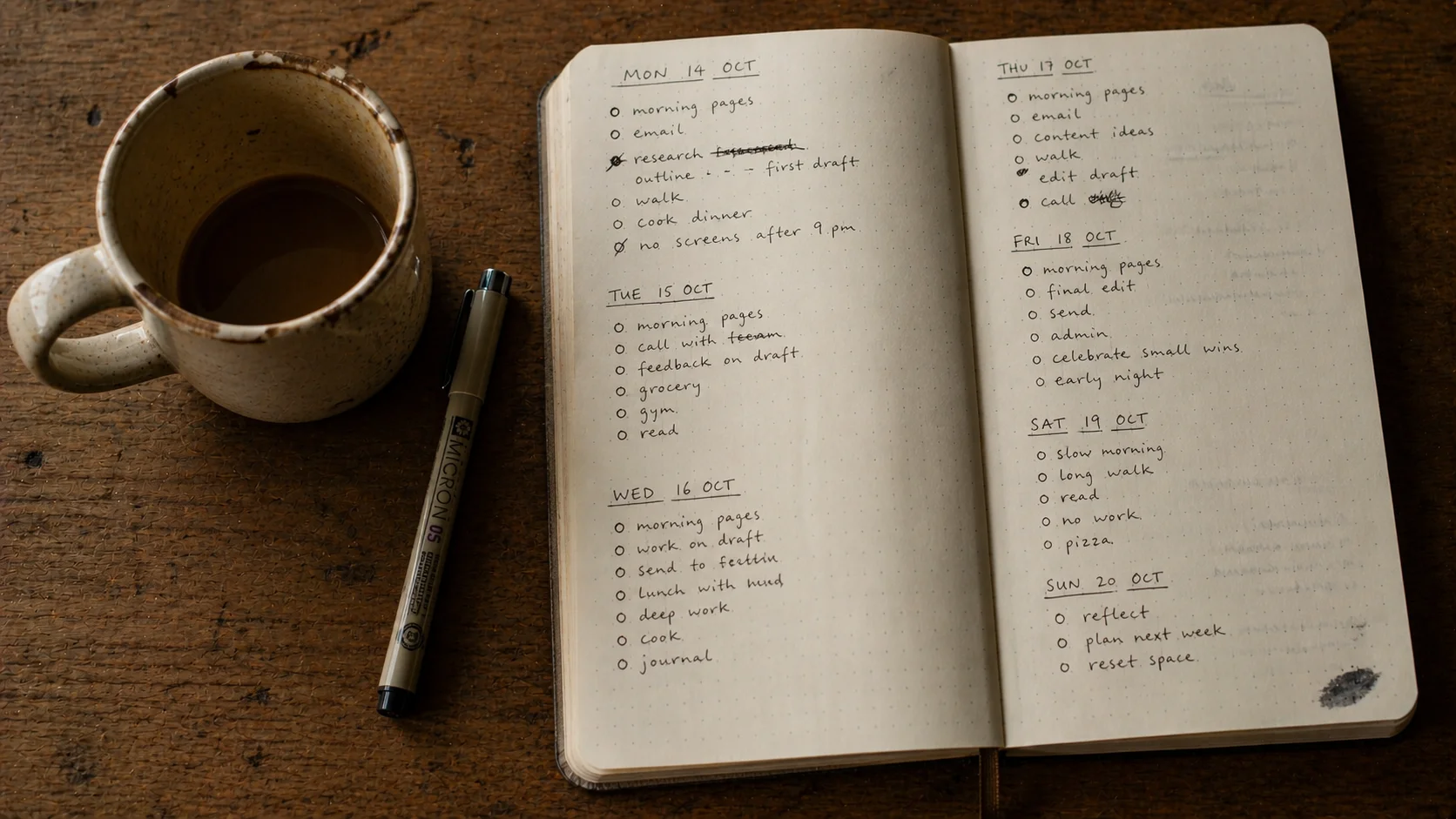
Bullet journaling looks aesthetically demanding from the outside, and almost nothing like that on the inside. It is a system of short, deliberate bullets—not paragraphs or artwork—designed by Ryder Carroll to keep tasks, events, and notes in one paper workflow.
The visible Pinterest aesthetic is optional. The underlying method is a product workflow, not a research-backed cognitive intervention. Adjacent studies of lecture notes, planning, and memory do not validate Bullet Journaling itself.
What you actually need to know
- 📓 Bullet journaling is a system, not an aesthetic — the rapid-logging, index, and monthly migration are the method; the brush-lettered spreads are decoration
- ✍️ Handwriting research is adjacent — a lecture-note study does not prove a Bullet Journal memory benefit
- 🧠 ADHD experiences vary — short capture may reduce friction for some people, while paper and migration add it for others
- 🎯 Migration is a review choice — it creates a decision point, not a demonstrated cognitive mechanism
- 📦 You can start tonight with a £4 notebook — the official guidance is that any dotted or blank notebook works; the rest is just consistent practice
This guide covers what Bullet Journaling is, where the research boundary lies, a minimum-viable setup, and ways to decide whether its workflow fits you.
What is bullet journaling?
Bullet journaling — or “BuJo,” in the practitioner shorthand — was developed by Ryder Carroll, a designer who started using a paper notebook to manage the attention difficulties he had lived with since childhood. He published the system as a book, The Bullet Journal Method, in 2018.
The method has two pieces. First is rapid logging: short bullets instead of sentences, with a tiny visual key to mark what kind of bullet each one is.
A • is a task. A ◯ is an event. A – is a note.
An × crosses out a completed task. A > migrates one forward. That is roughly the whole alphabet.
The second piece is structure. A bullet journal has four anchor pages — the index, the future log, the monthly log, and the daily log — and one ritual, the monthly migration, in which you carry unfinished items forward.
This sounds bureaucratic until you try it. In practice, the bullets and structure together produce a strange thing: a single notebook that holds everything you would otherwise lose, in a format you can actually scan.
Why the workflow may feel useful
Writing a task creates an external record. That ordinary fact is enough to explain the method’s appeal; we do not need to claim that it unloads working memory or produces a special cognitive effect.
Short bullets may reduce writing effort for some people. For others, compression removes context they later need. A blank page may feel demanding, or it may feel less restrictive than learning symbols and maintaining an index. These are interface trade-offs, including for people with ADHD, not fixed properties of one kind of brain.
The format can encourage a vague item such as “the thing about Q3” to become “draft Q3 plan; send to N by Friday.” That is a practical affordance, not proof of improved memory or task completion.
A bullet journal is not a diary. It is a thinking tool that happens to look like a notebook.
The migration ritual adds a recurring review. At the end of each month, you go through unfinished tasks and ask, of each one: do I still care about this?
If yes, you migrate it forward — write it again on the new page. If no, you cross it out.
Writing a task again is deliberate friction. Some users value the repeated decision; others experience it as duplicate work. The method offers the checkpoint, but research has not shown that manual migration improves prioritisation or follow-through.
What does the research support?
No randomised trial has tested Bullet Journaling as an intervention. Adjacent research can describe questions worth testing, but it does not establish that the method’s “underlying components” work as a combined mechanism.
Pam Mueller and Daniel Oppenheimer’s 2014 Psychological Science study compared longhand and laptop note-taking during lectures. Its experiments reported an advantage on some conceptual questions, and the authors proposed verbatim transcription as one explanation. It did not test journals, self-generated tasks, rapid logging, or migration. Later attempts to reproduce and extend the result have also made the simple “handwriting beats typing” headline less secure. Nothing in this literature establishes that compressing your own tasks into bullets improves encoding.
A second adjacent line concerns implementation intentions. A 2008 study by Gawrilow and Gollwitzer tested if-then instructions on a specific inhibition task in children with ADHD. A task copied onto tomorrow’s page is not necessarily an if-then plan, and that laboratory result does not show that a daily log initiates action or compensates for ADHD in everyday life.
The minimum-viable bullet journal
The four anchor pages cover almost everything most people actually need.
Index (pages 1–4). A simple table of contents. As you start new pages, you write the topic and the page number into the index. This is what makes the notebook searchable later.
Future log. A spread for the next six months at a glance, with three or four months per page. Doctor appointments, deadlines, birthdays, holidays — anything dated more than a month out goes here.
Monthly log. A two-page spread at the start of each month. Left page: a dated list (1, 2, 3…) of things that happened or will happen on those days. Right page: a flat list of tasks for the month.
Daily log. The page you live on. Date at the top, then bullets as the day unfolds. No structure beyond that.
That is the system. The Pinterest-aesthetic spreads — habit trackers, mood charts, coloured pens, washi tape — are optional decoration on top of this foundation.
If you are choosing between paper and an app
These companion guides go deeper on the trade-offs:
Common traps
The Pinterest-aesthetic trap is the biggest one, and it kills more bullet journals than any other failure mode. People see a photo of a beautifully spread monthly log on Instagram, attempt to replicate it, miss a day, feel embarrassed by the gap, and stop entirely.
The fix is to remember that the photo is not the method. The original system, as Carroll demonstrates it, is monochrome and practical — a working notebook, not a Pinterest portfolio. The aesthetic versions are essentially a different hobby that happens to share a name.
The second trap is over-engineering the system before you use it. Spending a Sunday designing a perfect tracker layout is rarely a bullet journal failure mode that survives — the tracker either gets used or it does not, and you find out within two weeks.
The third is abandonment after a missed week. Bullet journaling is not a streak. Migrating forward from a gap is the entire point of the migration ritual.
Open the notebook, write today’s date, start a new daily log. The previous gap is not a verdict.
A missed week is not a failure of bullet journaling. It is what bullet journaling is for — the migration is how you come back.
Bullet journaling vs digital alternatives
The question is rarely paper vs digital — it is usually which task fits which medium.
Paper may suit people who value a whole-page view, handwriting, and the deliberate friction of migration. Research has not shown that seeing and crossing out the page produces a stronger cognitive-offloading effect.
A digital app wins at search, reminders, sync between devices, and long-term archival. If you need to find what you were doing on a Tuesday in March eighteen months ago, a notebook is a worse tool than a journaling app with full-text search.
Hybrid setups are common. A bullet journal handles the day; an app handles the calendar, the searchable history, and the longer reflective entries you want to keep. The two are not in competition.
For readers who want a digital-only setup that captures some of the Bullet Journal feel, a Notion-based template can replicate the index, future log, and migration, with different privacy, friction, and portability trade-offs. For a structured short-form digital alternative, the five-minute journaling method uses a different compact format.
Who is bullet journaling for?
The honest answer is: anyone who wants to test a paper-based capture and review workflow.
Some readers with ADHD report liking short capture and one predictable notebook; others may find handwriting, manual indexing, or repeated migration difficult. The same variation applies to people with planning-heavy work or a history of trying many notebooks.
It does not land for everyone. If your work is largely digital and collaborative, if you almost never write by hand, or if the act of writing feels like a tax rather than relief, an app-first setup is likely a better fit. The encrypted journaling apps roundup covers digital options that share some of the same offloading benefit.
A simple BuJo starter routine
If you want to start tonight, this is the minimum viable version.
Step 1: a notebook and a pen. Anything blank or dotted. The official Bullet Journal notebook is fine; a £4 lined notebook is also fine.
Step 2: pages 1–4 are the index. Leave them blank for now. You will fill them in as you create new pages.
Step 3: page 5 is the future log. Six months in a grid. Add anything dated past this month.
Step 4: page 9 is this month’s log. Left side: dates 1–31, with one-line entries for what happened or what is scheduled. Right side: a list of tasks for the month.
Step 5: page 11 is today’s log. Date at the top. Then bullets as your day unfolds.
Total setup time: under twenty minutes. After that, you do nothing different until the end of the month, when you migrate.
Tonight: open a notebook, write today’s date, and capture every task in your head as a single bullet. No paragraphs, no decoration, no key — just dots followed by short fragments.
Aim for ten minutes if that feels manageable. One page is enough to test whether the workflow helps you capture and revisit tasks; it will not measure a cognitive mechanism.
Frequently asked questions
What is bullet journaling, in one paragraph?
Bullet journaling is a paper-based system designed by Ryder Carroll to capture tasks, events, and notes as short bullets — not paragraphs — and then migrate the unfinished items forward through the month. The bullets are rapid: a dot for a task, a circle for an event, a dash for a note. The system rests on four core pages — the index, the future log, the monthly log, and the daily log — and on a monthly migration ritual that forces you to decide what is still worth doing.
Does bullet journaling actually work?
No randomised trial has tested the Bullet Journal method. Mueller and Oppenheimer’s 2014 study compared longhand and laptop note-taking during lectures; it did not test journaling, rapid logging, migration, or personal planning, and later replication work has complicated its headline. Use the system if its workflow helps, not because research has proved a cognitive benefit.
Is bullet journaling good for ADHD?
Some people with ADHD report that short capture and one predictable notebook are useful, while others find paper, migration, or manual indexing burdensome. No trial shows that Bullet Journaling treats ADHD, unloads working memory, or works better than long-form writing. Treat it as an organisational interface to test, not an ADHD intervention.
Do I need a fancy notebook to start?
No. The official guidance from Ryder Carroll is that any blank or dotted notebook will do. The Pinterest-perfect spreads you have probably seen are an aesthetic subculture, not the method itself. You can start a working bullet journal with a £4 notebook and a pen this evening.
How is bullet journaling different from a regular to-do list?
A Bullet Journal combines short task, event, and note entries with an index, dated logs, and optional migration of unfinished tasks. A normal to-do list can also be archived or reviewed; the practical distinction is the published workflow, not a proven cognitive effect. Migration creates a recurring decision point, which some users find useful and others may find repetitive.
Can bullet journaling and a digital app coexist?
Yes, and many people end up with a hybrid setup. Paper handles the daily log, the migration, and any thinking-through; a digital app handles searchable archives, reminders, and shared calendars. The two are not in competition — bullet journaling is good at the things paper is good at, and bad at the things paper is bad at.
Further reading
- Paper Journals vs Apps: How to Choose — the broader paper-vs-digital question with the trade-offs spelled out
- Journaling With ADHD — practical formats without claiming a journal treats ADHD
- How to Start Journaling — the beginner gateway if bullet journaling feels too structured
- The 5-Minute Journaling Method — a structured short-form alternative for digital-first readers
- Notion Journal Setup — for replicating bullet-journal structure inside a digital tool
- The Best Journaling Apps — for readers who decide an app fits their life better than paper